
Event analytics
What are events?
Events are processes that have occurred in your EPM for Windows and Mac-managed applications.
How is the Events page useful?
Use the Events page to easily find all elevated applications, applications that are newly-matched to an application rule, or applications that are elevated by on-demand application rules.
Best practices
- When an application rule matches on a new or unknown application, we recommend you add that application to an existing policy, or create a new policy specifically for that application.
- For elevated applications, if they are higher risk applications or unwanted, we recommend you add them to a block rule.
The Events page
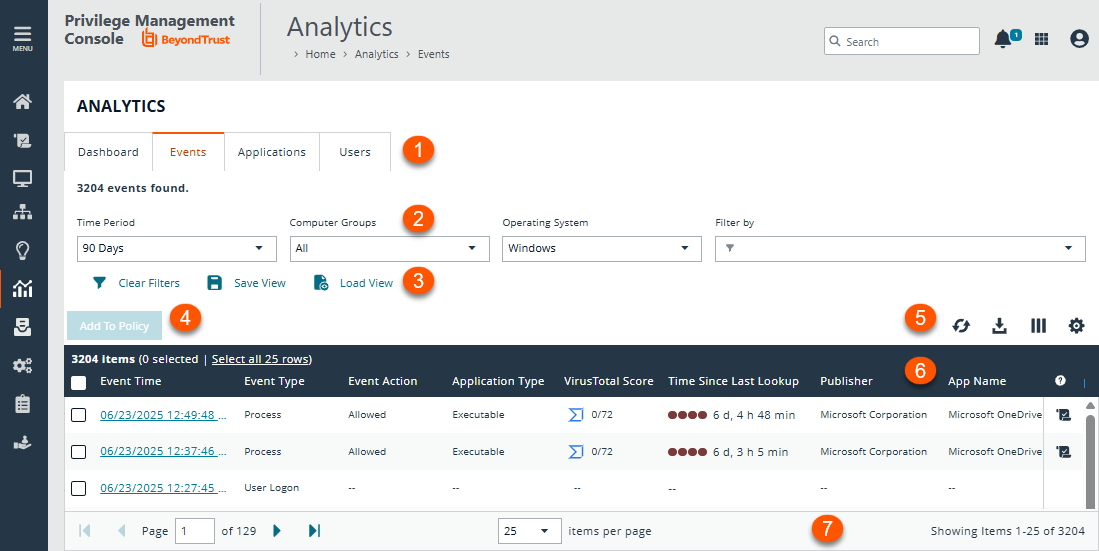
- Analytics tabs: Access the Dashboard, Events, Applications, and Users pages.
- Filters: Select a filter to refine your results. Click Clear Filters to remove all filters from your results.
Available filters
Event Time
Event Type
Event Action
Application Type
Publisher
App name
App description
Executable Path
File Path
Admin Required
Computer Groups
Operating System
Host Name
Host Domain
User Name
User Domain
User ID
User Domain ID
Policy Name
Policy Revision
Operating System
Host Name
Host Domain
User Name
User Domain
User ID
User Domain ID
Policy Name
Policy Revision
Message Name
Workstyle Name
Application Group
Application Description
Rule Action
User Reason
Application URIOn Demand
Token
Token Description
Command Line
Process ID
Application Group
Application Description
Rule Action
User Reason
On Demand
Token
Token Description
Command Line
Process ID
Parent Process ID
App Version
Drive Type
Host ID
Host Domain ID
Authorizing User Domain ID
Authorizing User Name
IP Addresses
File Owner ID
File Owner Name
File Owner Domain Name
Parent Process File Name
Parent Process ID
Download URL
Authorization Challenge Code
Unique Process ID
Product Code
Upgrade Code
Authorization Method
JIT Admin Session
JIT Admin Ticket Number
Elevation Method
Matched as Child Process - Save View and Load View: Save your filter preferences and load the view later for quick access to your most frequently-used preferences.
- Add To Policy: Select events to add to your policy.
-
List options: Click
 to refresh the list,
 ![Download icon in [%=Products.PMAb%] SaaS.](https://files.readme.io/3cc3e35e3ac6a72ce0bc3747df69a1c29f39b1cb9e45570604098be3bff4b1eb-download-icon.png) to download the list to a .csv file,
to download the list to a .csv file,  to select which columns to display on the page, and
 ![Download icon in [%=Products.PMAb%] SaaS.](https://files.readme.io/1da1862e7b8565ca38a623a35c566249525c7215d7a8fce5c316680cbc54d44d-icon-grid.png) to configure your page display.
to configure your page display. - Columns: At-a-glance details for each event.
- List navigation options: Navigate in the Events list.
View an event's details
- From the left menu, click
 .
.
The Analytics page displays. - Click Events.
The Events page displays.
- Locate the event you want to view.
- Click the Event Time.
The Event Details panel displays, where you can review the event's application, policy, process, rule script, and session data. - Optionally, click
 to open the Event Details page, which displays additional data, including COM, process hierarchy, Trusted Application Protection status, and more.
Add an event's application to a policy
You can only add an event's application to an unlocked policy.
- From the left menu, click .
The Analytics page displays. - Locate the event that contains an application you want to add to a policy.
- In the event row, click
 .
.
The Add to Policy panel displays. - Select an unlocked policy and available application group from the drop-down list.
- Click Add and Edit Policy.
The Policy Editor opens and the Applications Group page displays. - Edit the application settings.
- Click Save Changes.
The policy saves.
Look up VirusTotal score
If you are using VirusTotal, update the reputation score on the Events page or the Event Details panel. A valid reputation for an application can help you make an informed decision on how to manage that application in your policy.
EPM caches the VirusTotal score and the URL. The URLs expire after 3 days. Click the VirusTotal icon to retrieve the latest value from VirusTotal.
To see the latest VirusTotal score:
Click the score or the VirusTotal icon to open the VT Augment widget for additional insights on the reputation of the file.
On the Events page, the following information helps you evaluate the reputation score on a file:
- VirusTotal score for applications with hash.
- Integrated with VT augment widget, which returns the HTML content of the widget report for a given observable.
- VirusTotal icon next to the score ensures row level refresh for events with VirusTotal support.
- A Timestamp column with last lookup time of the VT augment.
Additionally, the Event Details panel provides the VirusTotal score and last lookup time.
For more information about setting up VirusTotal, see VirusTotal Settings.
Export to CSV
- From the left menu, click .
The Analytics page displays. - Click Events.
The Events page displays.
- Clickto export all analytics data results in the currently filtered result set. The CSV download can include up to 5 million records when downloading from the Events page.
- When saving an export file:
- Select the maximum number of records to download.
- Select the columns to include. Select In View to include only the columns currently selected in your view. Select All Available to include all columns even those not currently displayed.
- Enter a file name.
- Click Prepare Download.
- Click the Notifications icon when the file is ready to download. Notifications only apply to the Events page.
Save and load views
EPM users with Analyze Group permissions can create and save a set of filters and columns so that the same set of filters does not have to be selected every time Analytics is accessed. Saving viewing preferences provides an easy way to return to views of data used frequently to monitor Endpoint Privilege Management activity in the estate.
You can load and save data sets from the Events page, Applications page, and Users page.
Access views on any device regardless of the device the views were created on.
- After selecting filters, select Save View to retain those preferences for viewing later. Preferences are saved locally.
- If a view name already exists, select Overwrite existing view, and then select the view you want to replace.
- The next time you access Analytics, your view settings are preserved. Click Load View to select and load a view.
- On the Load Event View pane, you can delete and refresh views.
Recommended views
The recommended views provide a selection of the most useful predetermined views. Use the views to review collected data and make informed decisions around policy editing.
- To access the views, go to Analytics.
- Click the Events tab.
- Click Load View, and then click the Recommended Views tab.
Recommended views for events load with the default filters.
| Name | Description |
|---|---|
| Process Details | Find every process that EPM is controlling, with flexible filtering options, to zone in on the data of interest. The report name in legacy reporting: Process Details |
| User Interactions | Overview of how much friction end users are experiencing, and improve their experiences without jeopardizing security. The report name in legacy reporting: User Experience |
| Privileged Group Protection | Shows when EPM has prevented a user modifying a privileged group. For example, adding a user to the Admins group. All events where EPM prevented users from modifying privileged groups. The report name in legacy reporting: Privileged Account Management |
Updated 10 months ago
