
Endpoint Privilege Management for Linux 26.1.1
✨ Enhancements
Identity Services packages
Identity Services (AD Bridge) packages are now available in EPM-L SaaS to support using the Linux host authentication.
- Install Identity Services on RPM-based systems by adding the BeyondTrust repository and running
sudo yum install pbis-enterprise. - Install Identity Services on DEB-based systems by adding the BeyondTrust APT source and running
sudo apt install pbis-enterprise. - After installation, join your EPM-L tenant using the
tenantjoin-clicommand.
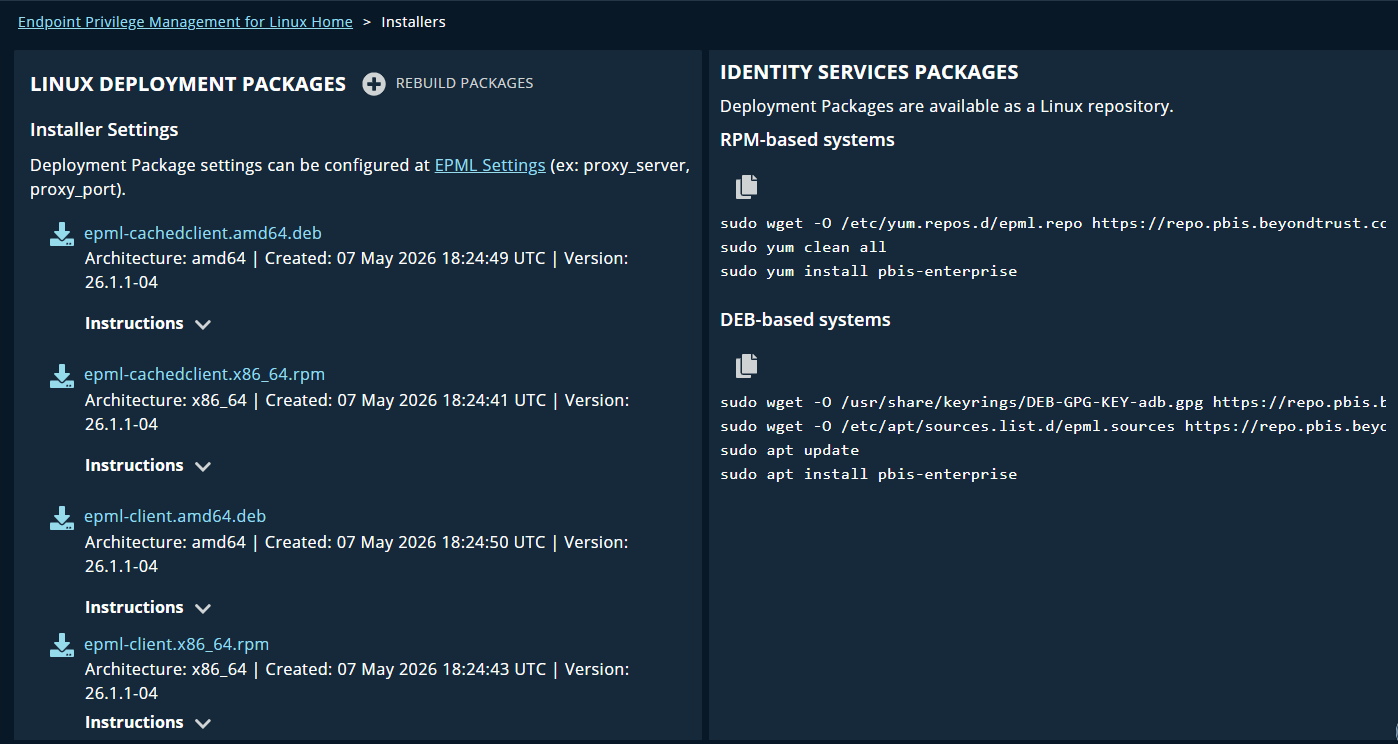
For more information, see Deploy Identity Services packages.
Change Management
The Change Management feature is now available, bringing it to parity with on-premises deployments. A new Change Management section has been added to the application with a grid view for reviewing change events. The application has also been updated to ensure that change management reason input fields are consistently present across all relevant actions.
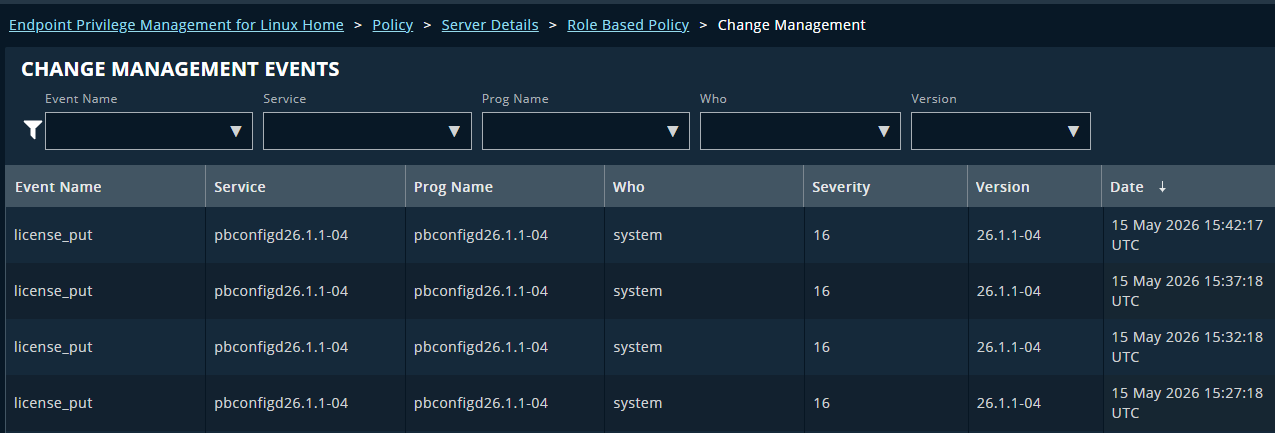
For more information, see Change Management.
Role-Based access restrictions
The application now enforces role-based access restrictions consistently across the interface. Actions and navigation routes that were previously accessible outside of their intended deployment context are now correctly restricted based on the authenticated user's assigned role. This applies to both the front end and back end of the application.
OpenTelemetry observability
The EPM-L SaaS server is now instrumented using OpenTelemetry (OTel), enabling standardized collection of metrics and traces. Telemetry data is forwarded to the centralized observability platform, improving visibility into service health and supporting faster diagnosis of issues.
🛠️ Issues resolved
| Product area | Description | Resolution |
|---|---|---|
| API | The SaaS public API definition contained typographical errors. | Typos in the SaaS public API (Swagger) definition are corrected. |
| API | Role-based policy GET API endpoints returned a 403 error when called without a name or ID parameter. | Role-based policy GET API endpoints now return all entities when no name or ID parameter is provided. |
| Authentication | Testing an Entra ID (Identity Bridge) directory services connection failed and produced a console error. | The Test Connection function for Entra ID (Identity Bridge) directory services connections now works correctly. |
| Configuration | The Prog and Who filter fields on the change management events page did not filter results. | The Prog and Who filters on the change management events page now correctly filter results. |
| Configuration | Input fields on the SIEM connection settings page were displayed at an unintended maximum width. | Input fields on the SIEM connection settings page are now correctly sized. |
| Configuration | Testing a Splunk Cloud SIEM connection that had only a name and URL configured returned a 502 error. | Testing an incomplete SIEM connection now returns a meaningful error message instead of a 502 error. |
| Configuration | When a SIEM connection failed to delete, the error message incorrectly referenced "elastic" instead of "SIEM." | The error message displayed when a SIEM connection fails to delete now correctly reads "Failed to delete SIEM connection credentials." |
| Configuration | When change management was enabled, deleting a role-based policy did not record the reason for change in the change management logs. | The reason for change is now correctly recorded in the change management logs when a role-based policy is deleted. |
| Configuration | Reloading the Settings page returned a 403 error instead of displaying the page. | The Settings page now loads correctly after a browser reload. |
| Configuration | Viewing transaction details for an empty or in-progress role-based policy transaction produced an error. | Viewing transaction details for an empty or in-progress role-based policy transaction no longer produces an error. |
| Configuration | In the transaction summary, items were grouped under an outdated group name when the group was renamed before additional members were added, resulting in inaccurate change summaries. | Transaction summaries now correctly reflect the current group name for all items, regardless of when a rename occurred. |
| Endpoint Privilege Management | PMUL settings that are not applicable to SaaS (those with no value, no default, and no configurable input) were incorrectly displayed in the settings list. | PMUL settings with no applicable value for SaaS are no longer shown in the settings list. |
| Endpoint Privilege Management | After the installers page was updated to include AD Bridge information, code blocks in the EPM-L installer instructions were indented more than intended. | Indentation in the EPM-L installer instruction code blocks is now correct. |
| Endpoint Privilege Management | There was no spacing between the PMUL settings filter box and the All Settings button. | Correct spacing is now applied between the PMUL settings filter box and the All Settings button. |
| Endpoint Privilege Management | Entering text in the PMUL settings filter box did not filter the settings list. | The PMUL settings filter box now correctly filters the settings list. |
| Endpoint Privilege Management | Clicking the search button on the Unified Search audit page produced a console error and did not query the events endpoint. | Searching on the Unified Search audit page now correctly queries the events endpoint and returns results. |
| Endpoint Privilege Management | The Endpoint licenses used count on the EPM-L license page was inaccurate because it did not account for auto-retired endpoints, which still occupy a license. | The Endpoint licenses used count now accurately reflects license consumption, including auto-retired endpoints. |
| Endpoint Privilege Management | Non-cached EPM-L client installation packages displayed the same installation instructions as cached clients, including steps that do not apply to non-cached installations. | Installation instructions for non-cached EPM-L clients no longer include steps that only apply to cached client installations. |
| Endpoint Privilege Management | The Event Search header on the Unified Search page used a different heading level and casing than headers on other pages in the audit section. | The Event Search page header now matches the heading style used across all audit pages. |
| Endpoint Privilege Management | When using the filter in PMUL settings, highlighted search results displayed with unexpected leading and trailing whitespace, causing words to appear broken apart. | Highlighted search results in PMUL settings no longer display with leading or trailing whitespace. |
| Session Monitoring | Clearing the filter on the Audit Search & Replay page displayed no records. A filter value such as "Today" was required to show any results. | The Audit Search & Replay page now displays records when no filter is applied. |
| User Management | The database allowed duplicate console users to be created, which could result in data inconsistency. | A database constraint now prevents duplicate console users from being created. |
| General | Resolved security issues from internal testing. |
