
BeyondInsight and Password Safe 26.1.0.878 release notes
For a list of supported platforms for the latest version of BeyondInsight and Password safe, see Supported Platforms.
Supported Platforms for previous versions of BeyondInsight and Password Safe can be found in the BeyondInsight, Password Safe, and U-Series Appliance Documentation Archive.
🆕 New features
Updates to Report Subscription Management
Report subscription management now offers the following features for improved clarity and flexibility:
- Subscriptions now support full post‑creation editing. You can modify all subscription parameters after a subscription is created, allowing administrators to update existing subscriptions as requirements change without recreating them from scratch.
This change is for Cloud only.
- Users can assign and update a custom logical name for each subscription and see that name wherever subscriptions are listed, making it easier to distinguish multiple subscriptions for the same report by purpose or audience.
This change is for Cloud only.
- The Edit Options menu is renamed to Edit Subscription , making it clear that the action opens the full subscription configuration and helping users quickly locate where to update subscription settings.
For more information, see, Analytics and Reporting.
Secrets Safe Inventory Reporting
We introduced a new Secrets Safe Inventory Report. The Secret Safe Inventory Report lists secrets and shows the date when each secret value was last changed. You can filter the report by safe, secret type, secret value age (older than a specified number of days), and by free‑text search on secret name and URL. The report groups results by safe, and you can sort columns within each group.
For more information, see Analytics and Reporting.
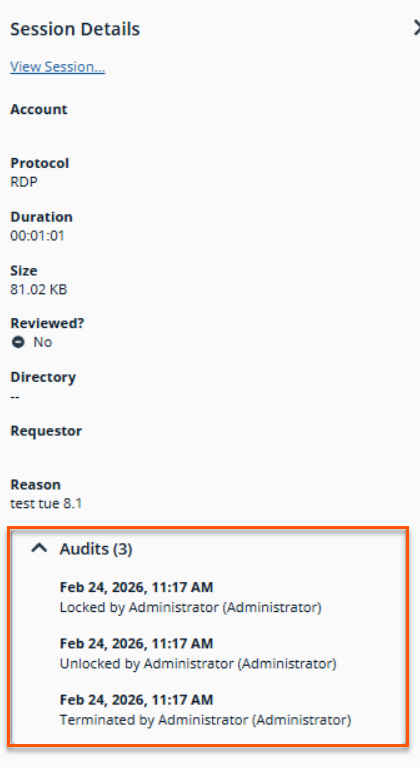
Enhanced accountability with expanded audit logging for the Session Details page
Password Safe audit logging now records which administrator locks, unlocks, or terminates a session. This gives security teams clearer accountability and makes it easier to investigate administrative actions on privileged sessions.
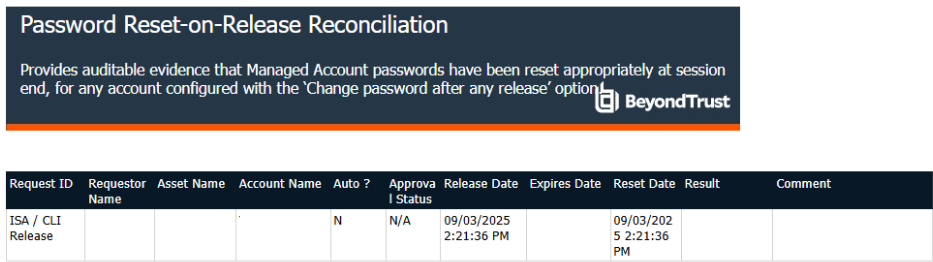
Password Reset-on-Release Reconciliation Report available in Password Safe Cloud
The Password Reset-on-Release Reconciliation report is now available for Password Safe Cloud environments. This report provides auditable evidence that managed account passwords have been reset appropriately at the end of a session for any account configured with the Change password after any release option.
For more information, see Analytics & Reporting.
Improved Secret Management visibility
- Secret records now track the last time the secret value itself was modified, separately from other metadata changes. This allows administrators to identify secrets whose values have not been updated recently and prioritize them for rotation.
For more information, see Secrets Safe: Configure.
Enable Pathfinder MCP gateway ecosystem access to BeyondInsight APIs
BeyondInsight can now participate in the MCP gateway ecosystem using token-based authentication compatible with MCP clients. This enables developers to interact with supported Password Safe and BeyondInsight APIs through MCP-enabled tools while maintaining secure and controlled access.
For more information, see MCP gateway.
Updated TLS 1.3 support
- Clients and servers can negotiate TLS 1.3 whenever both sides support it while still falling back to earlier TLS versions when needed, allowing customers to gain stronger encryption without disrupting existing integrations that rely on older protocols. Building on this flexibility, Password Safe now supports inbound and outbound TLS 1.3 for environments that can use it, enabling more secure connections while preserving expected behavior for current communication workflows.
- Client certification authentication is no longer supported for API registrations. The following warning message displays in the Configuration > General > API Registrations page and the Client certificate required checkbox is unavailable.

Important information
- For Cloud and Pathfinder versions only, TLS 1.3 is automatically enabled by default.
- The U-Series appliance controls the enabling and disabling of TLS 1.3 functionality.
✨ Enhancements
Expand AWS scan connector support to additional global regions
The AWS scan connector has been updated to support a wider range of global regions, including new locations in Africa, Asia Pacific, Europe, Israel, Mexico, and the Middle East. This update ensures that organizations can discover and manage assets across a more comprehensive set of AWS infrastructures.
For more information, see AWS Region Support.
Run Smart Rule Scan without opening Smart Rules grid
The Discovery Scan wizard now includes a Smart Rule picker on the Select Scan Targets page. This feature lets you create and manage scheduled scans directly from Smart Rule address groups. It simplifies scan configuration and keeps scan targets aligned with your existing Smart Rule logic.
For more information, see Discovery: Configure.
View Smart Rule category in the Group Details page of Smart Groups
The Smart Groups grid in the Group Details page now includes an optional Smart Rule Category column. Administrators can display, sort, and filter by this category to more easily locate and organize related smart groups.
For more information, see Configure: Smart Rules.
Value Last Changed tracking
- User and Group Management detail panels now show a Value Last Changed field for both users and groups. This helps administrators quickly identify when an account or group was most recently modified.
For more information, see Configure groups.
Display SAML login link even when FIDO2 is selected
The Use SAML Authentication login link is now shown whenever SAML is configured, even if FIDO2 is selected as the login method. This ensures users can always access SAML-based authentication without changing the login option first.
For more information, see Welcome to BeyondInsight.
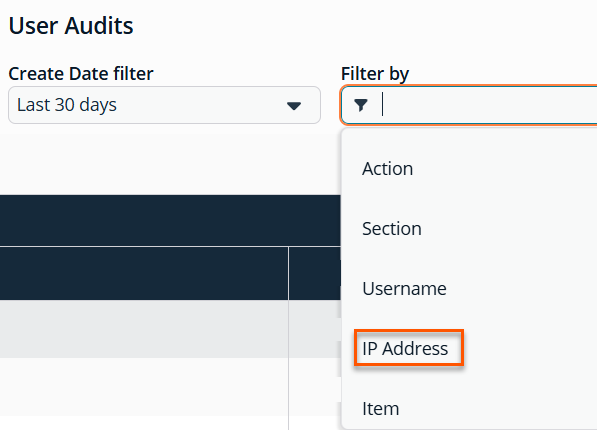
Expanded IPv6 capabilities for User Audit Search and Filtering
User audit records now include IPv6 address data when available, in addition to existing fields. This gives security and compliance teams more complete visibility into where actions originated, especially in IPv6-enabled environments.
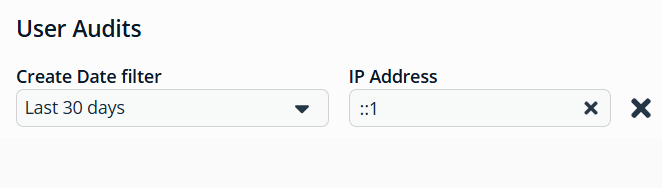
Searching by valid IPv4 and IPv6 addresses continues to work and match all possible combinations of IPv6 addresses For example, searching for ::1 returns results for both ::1 and ::0001.
Accessibility enhancements
As part of accessibility enhancements, we have made the following pages a more responsive layout, allowing them to be viewed and used on smaller screens or with higher browser zoom settings:
- Attributes page (Configuration > General > Attributes)
- Installer Activation Key page (Configuration > Authentication Management > Installer Activation Keys)
Password Safe Session & Keystroke Purging (Cloud-only)
Session and keystroke purging is now enabled by default for all new Password Safe Cloud customers.
- Standard:
- Default retention period: 1 year
- Maximum retention (Standard SKU): 1 year
- Premium:
- Default retention period: 3 years
- Maximum retention (Premium SKU): 3 years
🛠️ Issues resolved
| Product area | Description | Resolution |
|---|---|---|
| Analytics & Reporting | When exporting the report output to CSV in Password Safe Cloud, sub-report data is missing from the output. | The CSV export format in Password Safe Cloud now includes sub-report data. |
| Password Safe | Hyperlinks in email notifications for password release requests (such as approve and deny links) fail to open correctly. | Hyperlinks in email notifications for password release requests now work correctly. |
| Authentication | SAML SSO login to the BeyondInsight web console fails when the SAML Name claim value contains a plus sign (+) character. | SAML authentication now correctly handles special characters, including the plus sign (+), in the Name claim value. |
| Authentication | Attempting to update the SAML site access URL from the tenant ID hostname to a vanity/CNAME hostname fails when clicking Save. | Saving updates to the Site Access URL in the SAML configuration now works correctly when switching to a vanity or CNAME hostname. |
| API | Downloading file secrets through the API produces a larger than the original and does not match the version downloaded from the web console. | Corrected the internal handling of binary data in the download API. |
| Smart Rules | Filtering a large number of accounts in a Smart Rule against Google Cloud Platform returns results slowly. | Organizational unit filtering for Google Cloud Platform account onboarding is now performed at the API level, improving Smart Rule processing performance for large environments. |
| User Management | When a domain user is locked out of BeyondInsight after failed login attempts, the Unlock option still appears in the User Management grid. Attempting to unlock the user results in an error because domain accounts can only be unlocked through the domain, for example, in Active Directory Users and Computers. | The Unlock option is no longer presented for domain users who are members of non-domain user groups, as domain account unlock operations must be performed through the directory service. |
| Configuration | When creating a new Active Directory Functional Account with Use SSL enabled from the Configuration > Functional Accounts page, an error is displayed and the account fails to save. | Active Directory Functional Accounts with Use SSL enabled now save successfully without error. |
| Endpoint Privilege Management | In the Web Policy Editor, selecting an Azure Government directory credential for an Account Filter does not return any groups in the search results. | The Web Policy Editor Account Filter now correctly retrieves groups when using Azure Government directory credentials. |
| BeyondInsight | After upgrading to BeyondInsight 25.1.1, the EPM system tray on Windows endpoints displayed the policy name followed by “revision 0” and did not show the policy date. | Updated the Windows client system tray to read the policy’s revision and date so the tray information now matches the effective policy. |
| Upgrade | Duplicate entries into the evtTableMonitor table can cause an upgrade to fail. | Resolved an upgrade issue that could occur if duplicate entries exist in the Event Table Monitor at the time of upgrade. |
| Authentication | SSO login fails with a server error for users who are members of a large number of groups (approximately 60 or more). | SSO login now succeeds for users who are members of a large number of groups. |
| Authentication | When logging out of the Workforce Passwords browser extension, the server-side single logout (SLO) is not invoked, leaving the identity provider session active. | The Workforce Passwords browser extension now performs a server-side logout, ensuring the identity provider session is properly terminated. |
| RDP | Slow download of RDP file when requesting from Password Safe Portal due to slow startup time of Identity Service. | Improved startup speed of Identity Service. |
| Password Safe | When the Unlock accounts on password change setting is enabled and a managed Active Directory account is locked, initiating a password change reports a failure even though the password is actually changed in Active Directory. This causes a password mismatch between Password Safe and the directory. | Password Safe now correctly records the outcome of password changes for locked Active Directory managed accounts, preventing password mismatches between Password Safe and the folder. |
| Session Monitoring | The Password Safe Session Monitor (PBPSMON) does not correctly detect password fields in Active Directory Users and Computers (ADUC), resulting in passwords being displayed in plain text during session recording review and in keystroke events. | PBPSMON now correctly detects password fields in ADUC, ensuring passwords are masked in session recordings and keystroke events. |
| Password Safe | When attempting to delete a Custom Platform Plugin, the operation fails and returns a 404 error. | Custom Platform Plugins can now be deleted as expected. |
| Analytics & Reporting | The Account Password Age by Last Scan report returns no records even when scan data exists. | Data processing has been made more resilient to better support different date formats which should reduce issues with the Account Password Age by Last Scan report. |
📝 Requirements
- Direct upgrades to 26.1 are supported from BeyondInsight versions 24.1.1 or later releases.
- BeyondInsight 26.1 supports SQL Server 2016 SP2 or higher.
🗒️Notes
- This release is available by download for BeyondTrust customers (https://beyondtrustcorp.service-now.com/csm) and by using the BeyondTrust BT Updater.
- The SHA-256 signature is : f9550bfd5696df735461b7c1f44a43f052a949c84587555b239907f0b9798b49
- The SHA-1 signature is: 66906f15af1e0285de861fd00e569fa91be45ccb
- The MD5 signature is: b77a7c7bfbe813a62cd9a09bd05bfdd0
⏰ Deprecation notices
- Analytics & Reporting features that depend on SQL Server Reporting Services (SSRS) will be impacted in an upcoming release. For more information, see SQL Server Reporting Services (SSRS) discontinuation and on-premises U-Series Reporting.
- In a future release, the Active Directory Bridge integration, including reports will be removed.
- In a future release, support for RADIUS two-factor authentication will be removed.
- In this release, the previously deprecated Cloud - Office 365 and Cloud - Azure platforms no longer function properly and will be removed starting in the 26.2 release.
