
AD Bridge 26.1 release notes
🆕 New features
New license key for Active Directory - 3.0
Introducing License Key v3.0 for Active Directory deployments, making it easier to generate and manage the licenses. The new streamlined experience simplifies how license types, models, and evaluation options are chosen.
BeyondTrust Bridge license management
BeyondTrust Bridge now includes license management, providing a modern, centralized place to handle v3 licensing. This means managing licenses directly through the Bridge UI, no need to rely on the legacy BeyondTrust Management Console experience, with more improvements to license administration on the way.
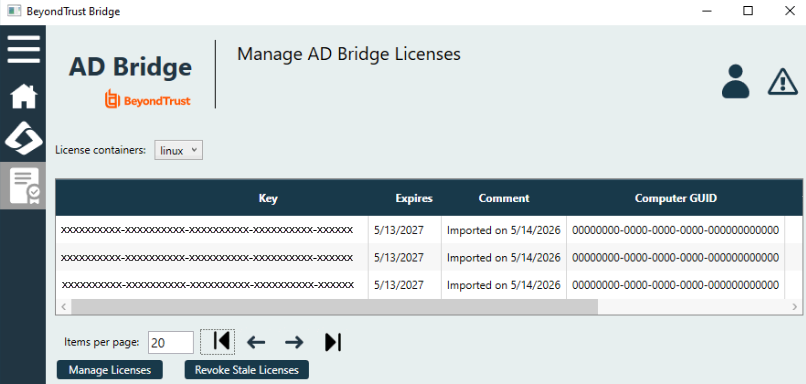
For more information, see Manage AD Bridge licenses.
Product rebranding for Linux packages to BeyondTrust Identity Services
Linux packages are renamed to BeyondTrust Identity Services to better reflect the product's capabilities beyond Active Directory alone. Customers will see the updated naming across packages and related touchpoints, with no disruption to existing workflows.
✨ Enhancements
Encrypt Active Directory machine credentials
Machine-level credentials stored on Linux (including machine account passwords and Entra/tenant secrets) are now encrypted at rest. This strengthens security by eliminating plaintext storage and helps meet compliance requirements for credential protection.
Single RPM installer
Installing on Linux is now simpler with a single RPM installer. There's no longer a need to choose between separate RHEL7 and RHEL8+ FIPS packages, one installer covers it all.
Entra ID registered application protections
Added new security protections for the registered application used in Entra ID integrations. Application credentials are now handled more securely, reducing risks from secrets stored on disk and giving greater confidence in cloud-connected deployments.
Identity application support and input renaming for tenantjoin-cli
Set the Identity Application (formerly Schema Connector App) by ID or name using the new --identity-id and --identity-name flags. Introduced --endpoint-key and --endpoint-keyfile options for more flexible endpoint configuration.
For more information, see Domain Join tool commands and Join to Entra ID.
🛠️ Issues resolved
| Product Area | Description | Resolution |
|---|---|---|
| Configuration | The AssumeDefaultDomain and UserDomainPrefix settings appeared far apart in the configuration options list, making their dependency relationship unclear. | The AssumeDefaultDomain and UserDomainPrefix settings are now grouped together in the configuration options list to reflect their dependency. |
| Domain Join | On Debian and Ubuntu systems, network profiles were not updated with the DHCP hostname value during domain join when a bonded network interface was present. | Domain join on Debian and Ubuntu systems now correctly updates network profiles with the DHCP hostname value. |
| Domain Join | Joining a domain via IP address using a Password Safe configuration file produced a certificate verification error after an OpenSSL upgrade. | The error message displayed when certificate verification fails during a Password Safe domain join now clearly identifies the cause of the failure. |
| Domain Join | After leaving a Microsoft Entra ID tenant, attempting to join an Active Directory domain failed with an ERROR_PRODUCT_VERSION error. | Leaving a Microsoft Entra ID tenant and then joining an Active Directory domain now completes successfully. |
| Domain Join | Upgrading from a version earlier than 24.x on RHEL 8 systems where the DHCP hostname was not set in the network configuration caused an ERROR_BAD_CONFIGURATION error when leaving the domain. | AD Bridge now handles missing DHCP hostname entries in network configuration files gracefully during upgrades, preventing errors on domain leave. |
| Domain Join | When using a Password Safe configuration file with a UPN-formatted account name (for example, [email protected]), the domain join failed with a LW_ERROR_NO_SUCH_USER error. | Domain join using a Password Safe configuration file now accepts UPN-formatted account names. |
| Installation | On RHEL and other RPM-based systems, relabeling was done once per SELinux policy module during installation, causing unnecessary delays. | Relabeling occurs once after all SELinux policies on RPM-based systems have been imported, improving installation performance. |
| Installation | The DB Utilities installer on Windows was missing the UI text table, causing blank or empty labels in the installer interface. | The UI text table is now included in the DB Utilities installer, ensuring labels display correctly. |
| Licensing | After manually applying a site license key and restarting the gpagent service, the license was unassigned and reverted to the basic license. | Site license keys applied manually are now retained correctly after the gpagent service restarts. |
| Licensing | When the license container was missing the required permissions for domain computers, the error code returned (40331) provided no indication of the cause. | AD Bridge now returns a descriptive error message when domain computers lack the required permissions on the license container. |
| Licensing | Running gpupdate --rsop or gpupdate hung indefinitely on systems with a basic license that lacked Group Policy feature entitlements. | gpupdate and gpupdate --rsop no longer hang on systems with a basic license that does not include Group Policy feature entitlements. |
| Licensing | Running domainjoin-cli leave --deleteAccount with an expired license produced a generic ERROR_NOT_FOUND error that did not indicate whether the leave or the account deletion had failed. | The domainjoin-cli leave --deleteAccount command now returns separate status responses for the domain leave and the account deletion, and succeeds even when the license has expired. |
| Licensing | When using setkey-cli to apply a license key that did not exist in the AD license container, the resulting ERROR_CTX_LICENSE_NOT_AVAILABLE error did not explain why the key could not be found. | The error returned by setkey-cli when a key is not found in the AD license container now includes a message indicating the key was not located in the container. |
| Support | On systems where the syslog configuration defined no daemon or kernel log entries, the pbis-support.pl support pack tool resolved the default log path to the root partition and attempted to archive it, filling the disk. | The pbis-support.pl support pack tool now correctly identifies default log paths and no longer includes unintended filesystem content in the support bundle. |
| Tenant Join | Azure group membership defined in sudoers did not work correctly; attempting to sudo as an Azure user in the group triggered a repeated device code authentication loop. | Sudo rules that reference Azure groups now work correctly for Azure AD users. |
⛔ Known issues
- License assignment fails when container license count exceeds the LDAP policy MaxPageSize value.
Workaround: Increase MaxPageSize to a value greater than the number of licenses in the container. For example, if the container holds 1700 licenses, set MaxPageSize to 2000. This issue will be resolved in release 26.2.
⏰ Deprecation notices
- Support for SUSE Linux Enterprise Server 12 SP5 has been removed. See the platform support documentation for the list of supported operating systems.
