
Identity Security Insights 25.12.1
December 19, 2025
🆕 New features
Secret Security: Secrets and Secrets Inventory
Secrets sprawl across clouds and tools, often with over‑broad access and stale rotation is a high‑impact path for compromise. Secret Security gives you one place to see, triage, and fix these risks quickly.
New section and menu items
A new Secret Security area is available in the Insights menu with two items:
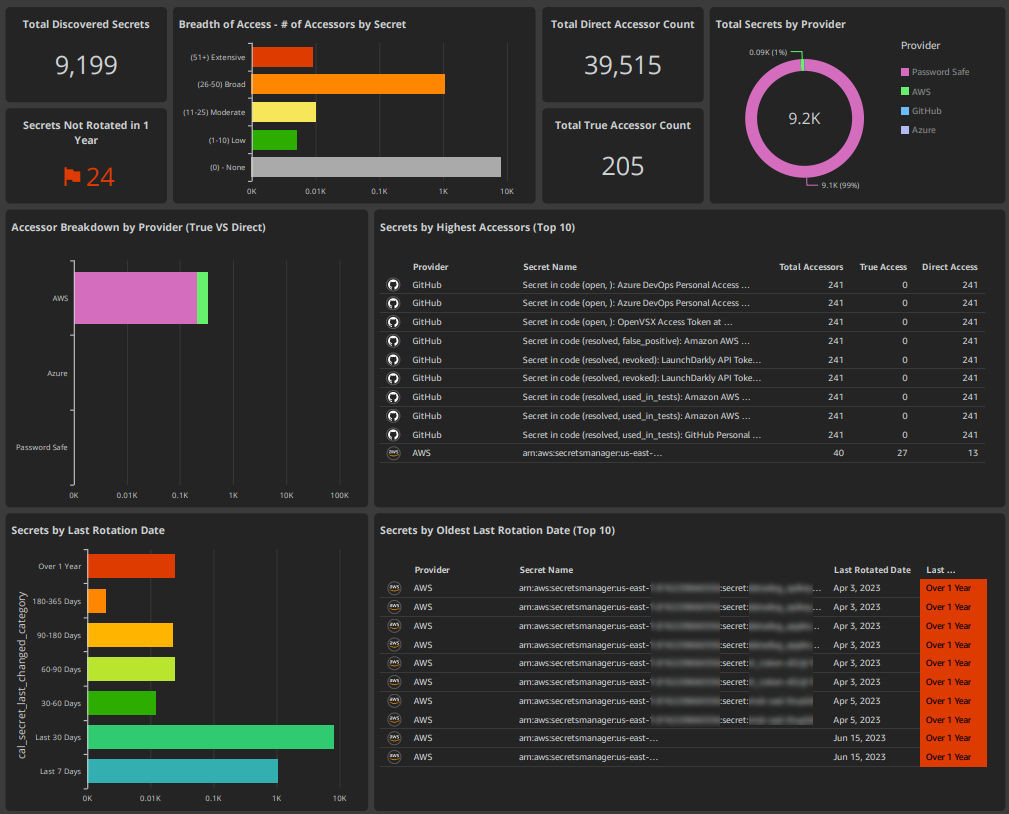
- Secrets: Overview dashboard for posture, rotation hygiene, and access breadth
- Secrets Inventory: Full, filterable catalog with detailed metadata and access analysis
From the main Insights Dashboard, selecting the Secrets count opens Secrets. Any drill‑down from visuals routes to Secrets Inventory, pre‑filtered to that slice.
Supported Providers
AWS Secrets Manager, Azure Key Vault, GitHub secret scanning, BeyondTrust Privileged Remote Access (vaulted accounts), BeyondTrust Password Safe (managed accounts)
What You Can See
- Overview KPIs: Total Discovered Secrets, Secrets Not Rotated in 1 Year, provider breakdown
- Overly Broad Secret Access: Secrets grouped by accessor count
- Direct vs True Access: Configured grants vs effective runtime access
- Inventory fields: Lifecycle, rotation status, total accessors, and Access Paths
Why It Matters
Shrink blast radius by reducing oversized audiences, close rotation gaps fast, and validate effective permissions across all providers from a single view.
OpenAI and ChatGPT connectors
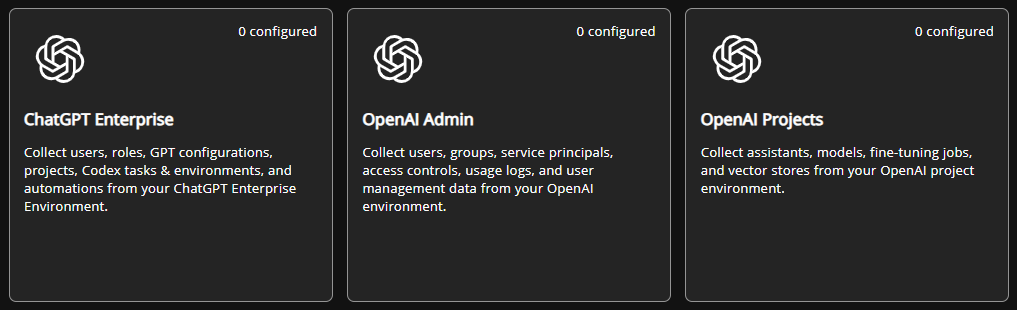
Three new connectors are now available in the connectors area: OpenAI Admin, OpenAI Projects, and ChatGPT Enterprise.
What You Can See
- Accounts View: OpenAI and ChatGPT users appear alongside your existing accounts with privilege levels automatically identified (organization owners, workspace admins, project owners)
- AI Agents: OpenAI Assistants and ChatGPT GPTs are tracked as accounts, showing which users can access or control them
- Identity Linking: Accounts are linked to identities where applicable
- Access Paths: Graph analysis reveals user-to-agent relationships and who owns administrative or project-level API keys
AI Security Analysis
- Tool Capabilities: See exactly what each Assistant and GPT can do: code execution, file access, web browsing, image generation, or custom API calls
- Risk Assessment: Identify high-risk scenarios like privileged users controlling agents with code execution, overshared GPTs, or admin keys with organization-wide access
- Attack Surface: Understand which user compromises would grant access to dangerous AI capabilities
- Entitlement Tracking: View which users can use which agents, and which tools those agents can access
Google connector: Vertex AI and Discovery Engine support
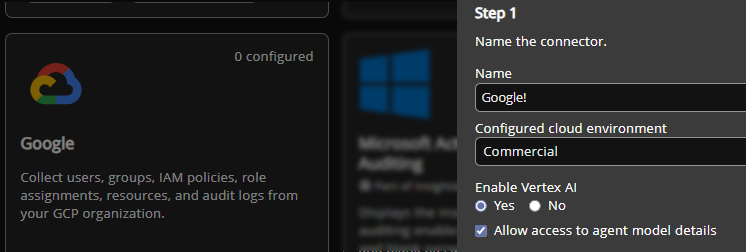
The Google connector now includes an Enable Vertex AI setting (Yes/No) and an Allow access to agent model details option. Selecting these options provides custom scripts that allow Insights to collect Vertex AI and Discovery Engine data.
What are Vertex AI and Discovery Engine?
Vertex AI Reasoning Engines are autonomous AI agents that organizations deploy to automate tasks like customer support, data analysis, and workflow processing. These agents run under service accounts and can access GCP resources based on inherited IAM permissions.
Discovery Engine powers AI search and conversational interfaces (chatbots) that query organizational data stores, documents, and databases to answer questions and provide recommendations.
Where You'll See This
- AI Security section: Vertex AI agents and Discovery Engines appear with their entitlement paths, service account associations, and inherited IAM permissions.
- Accounts view: GCP AI agents appear as accounts.
- Privilege graph coverage: Insights adds nodes for Vertex AI agents, models, endpoints, service accounts, and projects, plus edges that map VertexAgent-runsAs >ServiceAccount-assigned > GCPRole and WorkspaceUser-synced > GCPUser-assigned > GCPRole so entitlement paths and inherited IAM show up end‑to‑end.
Why It Matters
- Excessive permissions: Identify over‑privileged AI agents
- Change control: See who can modify AI agents
- Data exposure: Understand what data AI search engines can access
- User mappings: Trace Workspace users to GCP AI roles
Salesforce connector: Agentforce AI agent and enhanced permissions support
The Salesforce connector now provides comprehensive visibility into Agentforce AI Agents, their plugins, and granular permission analysis.
What Are Salesforce Agentforce AI Agents?
Agentforce AI Agents are autonomous bots that organizations deploy in Salesforce to automate tasks like customer support, case management, and sales workflows. These agents run under specific user accounts and inherit permissions from Salesforce profiles and permission sets. Agents perform work by using plugins that include knowledge bases, action tools, reasoning engines, and external integrations.
Where You'll See This
AI Security section: Agentforce Agents appear with their backing user identities, assigned plugins, and inherited permissions.
Privilege graph coverage: Insights adds nodes for Agentforce agents, their plugins, and individual plugin functions. Edges map relationships including:
- Agent-hasPlugin > Plugin
- Agent-backedBy > User-assigned > Profile/PermissionSet
So agent capabilities and inherited permissions show up end-to-end.
Why It Matters
- Privilege escalation risks: Identify agents that run as high-privilege accounts
- Complete plugin visibility: See all agent tools and capabilities, including knowledge bases, action tools, reasoning engines, and external integrations
- Identity mapping: Trace which user account each agent runs as and what permissions it inherits
ServiceNow connector: AI agent and identity graph support
The ServiceNow connector now provides comprehensive visibility into ServiceNow AI agents, their tools, team memberships, and role-based access controls.
What Are ServiceNow AI Agents?
ServiceNow AI agents are autonomous bots that organizations deploy to automate IT service management, incident response, workflow automation, and customer support tasks. agents perform work by using tools that include record operations, integrations, search capabilities, and custom actions. Agents are organized into teams and interact with ServiceNow's role-based access control system.
Where You'll See This
AI Security section: ServiceNow AI agents appear with their assigned tools, team memberships, and associated permissions.
Privilege graph coverage: Insights adds nodes for ServicenowAgent, ServicenowTool (agent capabilities), ServicenowAITeam (agent groupings), ServicenowGroup, and ServicenowRole, plus edges that map:
- Agent-memberOf-->AITeam
- Agent-hasTool-->Tool
- User-memberOf-->Group-hasRole-->Role
- User-hasRole-->Role
So agent capabilities, team structures, and role-based permissions show up end-to-end.
Why It Matters
- Agent visibility: Identify all AI agents deployed in ServiceNow and their capabilities
- Tool tracking: See what actions each agent can perform through its assigned tools
- Team organization: Understand how agents are grouped into teams for management and access control
- Role-based access: Map users and groups to ServiceNow roles to understand permission structures
Cross-Domain Identity Federation: AD to Entra ID sync and Okta to GitHub federation
This update enhances cross-domain identity federation by adding Active Directory to Entra ID synchronization support (completing bidirectional sync visibility), plus Okta to GitHub identity federation through SAML and SCIM.
What Are Cross-Domain Edges?
Cross-domain edges map identity relationships across different platforms – showing when a user account in one system (like Okta or Active Directory) federates to, synchronizes with, or provides access to another system (like GitHub or Entra ID). These connections are critical for understanding privilege escalation paths that span multiple platforms.
Where You'll See This
Cross-domain graph coverage: Insights adds edges for:
- ADUser-syncedTo-->EntraIDUser (Active Directory accounts synchronized to Entra ID)
- OktaUser-SAMLAccess-->GitHubMember (Okta users federating to GitHub via SAML authentication)
- OktaUser-SCIMAccess-->GitHubMember (Okta users provisioned to GitHub via SCIM)
Entitlement paths:
- ADUser can reach Entra ID privileges (Directory Roles, RBAC Roles, API Permissions)
- OktaUser can reach AWS IAM Users through GitHub access
Why It Matters
Complete AD/Entra sync visibility: Understand privilege escalation in both directions when organizations sync identities between on-premises AD and cloud Entra ID
GitHub federation tracking: See which Okta users can access GitHub, whether through SAML SSO or SCIM provisioning
Cross-platform privilege escalation detection: Trace how compromising an on-prem AD account could lead to Entra ID cloud privileges, or identify scenarios where an Okta user logs into GitHub via SSO, gains read access to a repository containing hardcoded AWS credentials, and inherits the AWS permissions those credentials carry – from read-only access to full administrative control
Improved sync detection: Enhanced matching logic uses security identifiers for more accurate cross-domain identity correlation
