
Workforce Passwords Browser Extension 25.4.0.1 release notes
January 29, 2026
🆕 New features
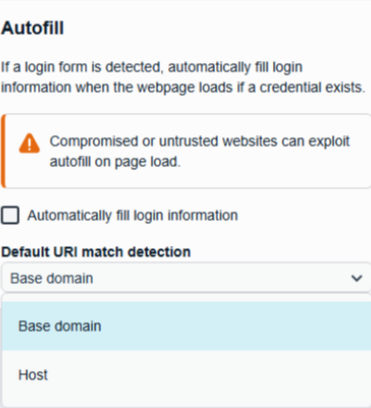
Configurable Uniform Resource Identifier (URI) Match Detection
We’ve added a new configuration option to allow better control over which credentials are presented for autofill on a given site.
Configurable from the Extensions Options page, the Default URI Match Detection option allows the following values:
- Base domain (default for prior browser extension releases)
- Host
To understand the URL https://mysite.ps.beyondtrustcloud.com/webconsole/login, use the following table:
| Section | Value |
|---|---|
| Top Level Domain | com |
| Second Level Domain | beyondtrustcloud |
| Subdomain | mysite.ps |
| Hostname | mysite.ps.beyondtrustcloud.com |
Base Domain
When Base Domain is selected, only credentials that have the same top-level domain and second-level domain are available for autofill. This means that credentials are shared across various sub-domains, such as a credential for okta.beyondtrust.com could be used on jfrog.beyondtrust.com.
For example, the URL https://mysite.ps.beyondtrustcloud.com would behave as follows if Base Domain was the selected behavior:
Host
When Host is selected, only credentials that have the same hostname and, if specified, port is presented for autofill.
For example, the URL https://mysite.ps.beyondtrustcloud.com would behave as follows if Host was the selected behavior:
🛠️ Issues resolved
🔧 Workforce Passwords
| Description | Resolution |
|---|---|
| When you deploy Workforce Passwords extension via GPO, you receive frequent notifications that Workforce Passwords has been updated. | Corrected the update detection logic to no longer incorrectly trigger an update notification. |
| On some websites, Workforce Passwords was inadvertently overriding the styling of the web page content. | CSS styling in Workforce Passwords has been adjusted to no longer ‘leak’ into the host website. |
📝 Requirements
Requires BeyondTrust Password Safe version 23.2.0 or later release.
🗒️ Notes
This release is available in:
