
U-Series Appliance 4.5.0 release notes
January 22, 2026
🆕 New features
Streamlined Certificate Management
Manage certificates with ease. Now you can view, import, edit, generate, export, move, and delete certificates directly from the Appliance web interface. No need for remote desktop or Microsoft Management Console (MMC). This enhanced workflow simplifies updates, supports all requested use cases, and even adds the ability to transfer certificates between appliances.
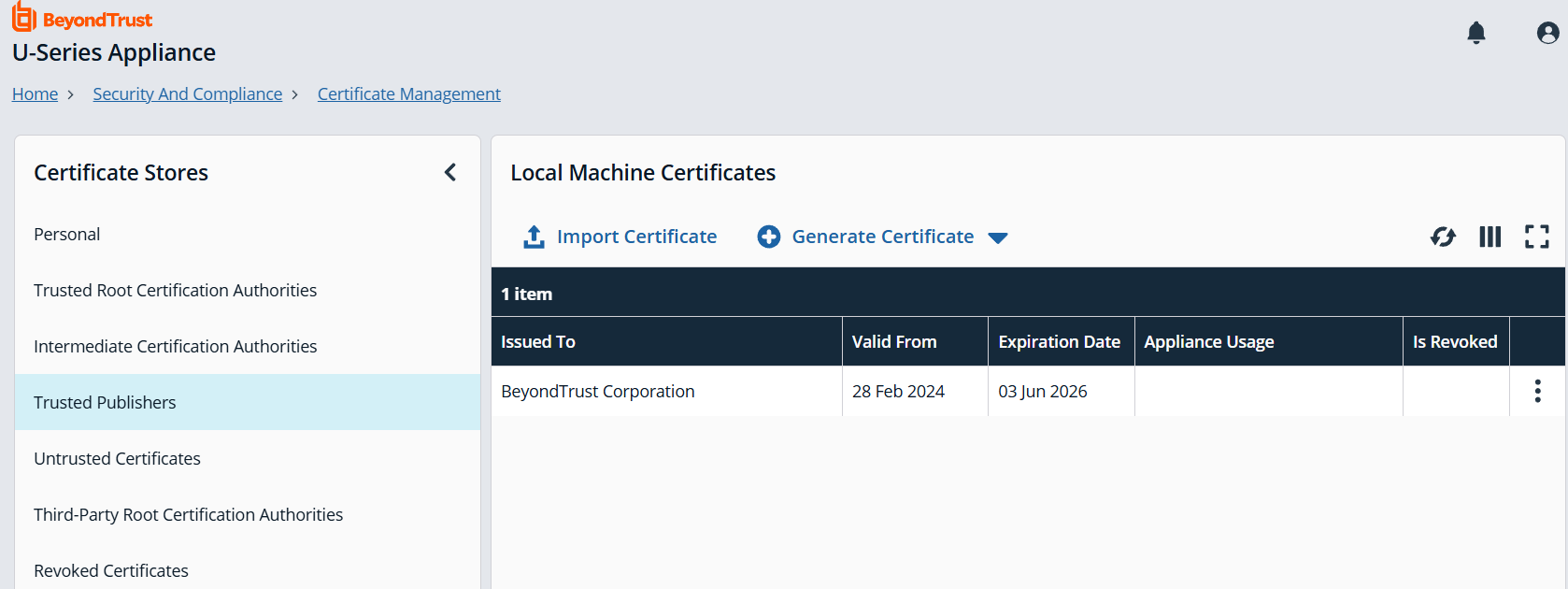
For more information, see Certificate Management.
Forced Encryption
Appliance users can now encrypt the data connection to Microsoft SQL Server using a certificate of their choice without the need to establish a Remote Desktop Protocol (RDP) session. This enhancement eliminates the previous requirement to manually upload certificates and configure encryption through the BeyondInsight Configuration Tool or SQL Server Network Configuration.
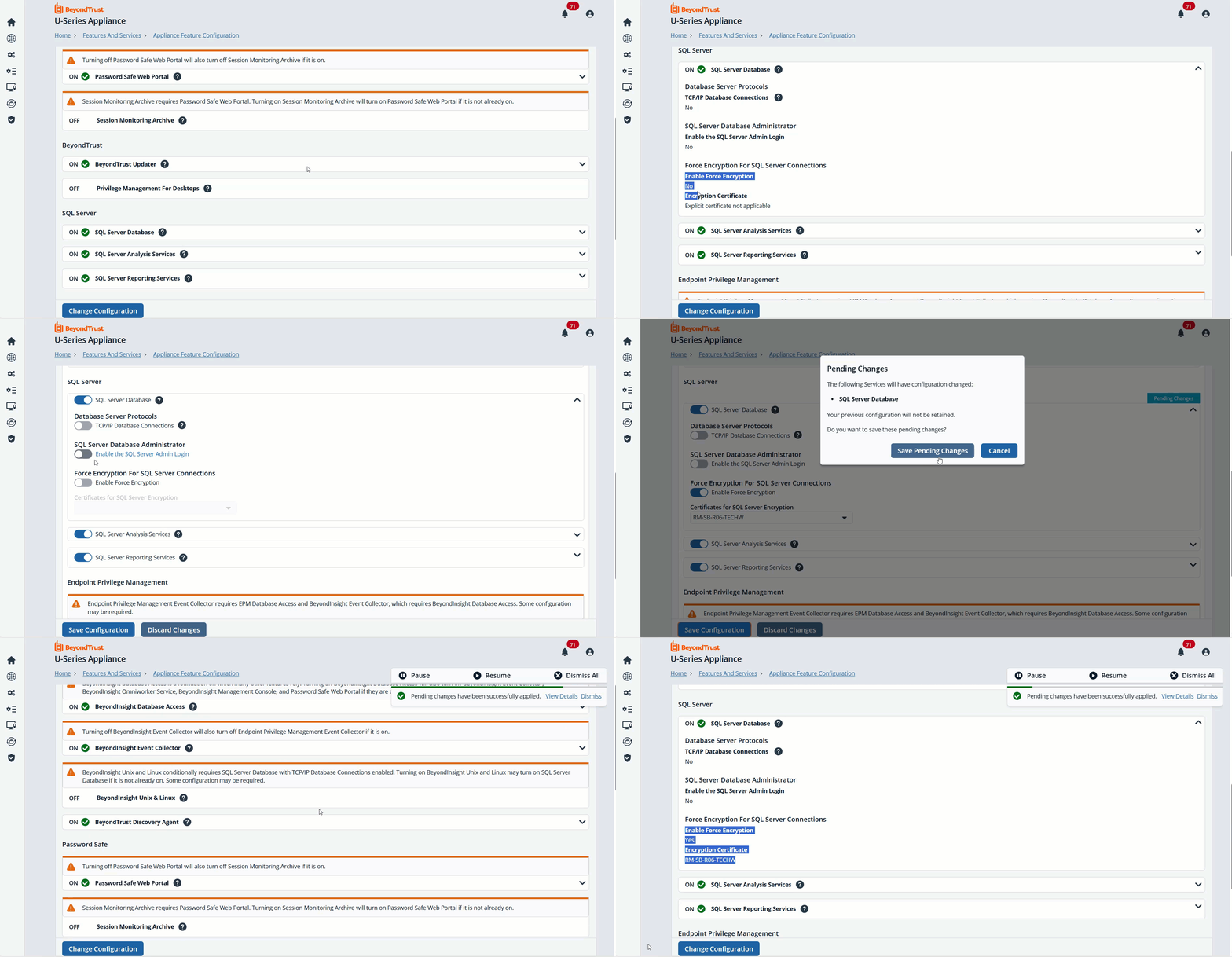
For more information, see Forced Encryption for SQL Server connections.
✨ Enhancements
Proxy server
Proxy configuration settings have been removed from Password Safe. All proxy server settings are now managed directly on the U-Series appliance, providing a centralized and streamlined configuration process.
Certificate management for mirroring between the two high availability (HA) nodes
We’ve introduced enhancements to simplify certificate management. These improvements reduce manual configuration steps, minimize administrative overhead, and improve overall security compliance. Administrators can now manage certificates more efficiently, ensuring a smoother setup and maintenance process for HA deployments.
For more information, see Certificate mirroring between two HA nodes.
🛠️ Issues resolved
| Issue | Resolution |
|---|---|
| All users were added to the Notifications drop down. | Removed non-admin BeyondInsight users from notification drop down |
| Password fields are not cleared when navigating away from the page. | Password fields are cleared when navigating away from the page |
| The all panels, including the Welcome panel, remain open when the system automatically logged out. | All Open dialogs are closed when the logon page is shown. |
| When you deploy and configure an Azure appliance if the appliance name is same, the Configuration wizard displays an error message while you configure the Phoenix client. | Makes sure your computer is renamed every time it needs to be. |
| When you use Dark Mode theme, the colors in the Notifications drop down do not follow the scheme colors. | Colors in Notifications drop down now follow the colors of the selected theme. |
| Performance graphs are not responsive with minimum supported screen resolution. | Graphs align with screen resolution. |
| The Slider feature moves visually when you click the Discard button from the Features and Services panel. | The message, There are no changes to be discarded displays when there are no discarded changes. |
| A generic 404 message displays on the root site when you type URL at the root site. | Created custom error pages for missing (404) pages. |
| A visible gap or blank space appears in the backup and restore table when the window size is changed. | UI adjusted to remove the gap. |
| When you click the Forgotten Password link, there is not an option to return to the Login page. | A link to return to the login page was added. |
| There is no tooltip for the Enter the NFS File Share Location section on the Log File Export page. | A tooltip now exists for the feature. |
| When you select to configure backups later in the Configuration Wizard, the calendar text turns to red. | Removed the red text as it was unnecessary. |
| SQLFree computers do not backup the RetinaCSDatabase, however in the options to create a backup, the BeyondInsight Database is one of the available options. | Added static text to indicate that remote database will not be backed up. |
| An error message displays when you enter a value exceeding the upper bound in Database Connection Settings. | Fixed validation to give the correct error message. |
| Permissions and logins are created on installation and not when a feature is enabled. | Initial checks are removed from the installer to a service, so it can check when the feature is enabled. |
| The URL path to the Proxy Server page does not match the actual page name. | The URL path is updated. |
| Previously scheduled events (backups, log exports, etc.) no longer run on schedule. | Updated stored schedules to reference the proper service name. |
📝Requirements
- .NET 8.0 or later (available through BT Updater via Supporting Software SUPI subscription)
- SUPI 3.3.2 (available through BT Updater)
🧩 Dependencies
- Security Management Appliance is dependent on BeyondInsight 24.1
