
Password Safe Mobile app 1.5.0 release notes
🆕 New features
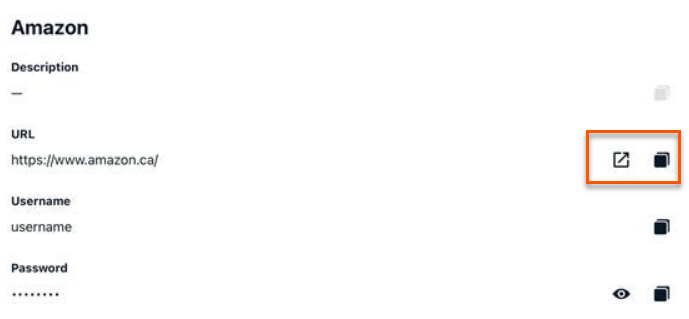
Launch URLs directly from Secrets Safe secret details
You can now tap a Launch button next to the URL field on the Secret Details panel in the mobile app to open the associated website or app directly, without copying and pasting the URL manually.
✨ Enhancements
Multi-site support in the Password Safe mobile app
The Password Safe mobile app now supports multi-site environments, allowing you to switch between sites directly within the app, no re-authentication required.
For more information, see Multi-site support.
In-app notification for available app updates
The mobile app now displays a notification modal at launch when a newer version of the app is available, helping you stay current without manual version checks.
For more information, see Update notification .
Performance and security improvements
We have included performance, stability, and security improvements. We have also included updates to frameworks and libraries, as well as upgrades the Microsoft Intune SDK which resolves security-related issues.
🛠️ Issues resolved
| Description | Resolution |
|---|---|
| Users were unable to sign in using SAML on 25.2 and 26.1. | SAML authentication now completes successfully, and users can sign in as expected. |
| Unnecessary biometric prompt after signing in with username and password, users were prompted again for biometric authentication. | The redundant biometric prompt after a successful username/password sign-in has been removed. |
| Offline data inaccessible after biometrics. Offline data could not be retrieved after passing biometric authentication from the login screen. | Offline credentials are now available after biometric authentication from the login screen. |
| The system fails to generate per-secret audit events when users view secret details, resulting in missing audit records for secret access. | The app now makes the required API calls when viewing secret details and values, ensuring the correct audit events are recorded. |
| Offline Password Safe and Offline Secrets Safe tiles could appear even for users without access to that product. | Offline tiles now appear only when offline storage is enabled, and the user has access to that product. Now it is consistent across the online home, offline home, and offline side menu. |
📝 Requirements
- Password Safe 25.1 or later
- Password Safe 25.3 or later for offline mode.
